
This guide is for owners and staff at small CPA and bookkeeping firms who keep the books for many small clients in QuickBooks Online. You've probably tried a chatbot, sat through a few vendor demos, and still aren't sure which AI tools for accounting would actually save your team hours each month. Below, we sort the options into five categories, share seven questions to ask any vendor, and lay out a 30-day test.
The five kinds of AI tools accountants use
Most "best AI tools" lists mix very different products together. It helps to sort them by the job they do, because a firm usually needs one tool per job, not five tools for the same one.
| Category | What it does | Examples | Where it helps a small firm |
|---|---|---|---|
| General AI assistants | Drafts, summarizes and explains text and spreadsheets | ChatGPT, Claude, Microsoft 365 Copilot | Client emails, engagement letter drafts, Excel formulas, explaining a variance in plain English |
| AI inside the ledger | Categorizes transactions and flags anomalies inside the accounting software | Intuit's AI agents in QuickBooks Online | Faster categorization in each client file |
| Document capture | Reads receipts and bills and sends the data to the ledger | Dext | Less manual keying of receipts and vendor bills |
| Practice management with AI | Summarizes email threads and drafts client updates | Karbon | Less time in the inbox chasing documents |
| AI accounting work across clients | Runs reconciliations, journal entries and reviews across many client files | Aqqrue | Monthly close work for a full client roster |
A few notes on each category, so you know what you're buying.
General AI assistants are the easiest place to start, and they're good at language and analysis work. Ask one to rewrite a stern late-documents email so it sounds friendly, explain why gross margin dropped in March, or help build an Excel formula. They won't automatically have access to your client's books: that depends on the apps you've connected, the permissions you've granted and the files you've supplied. Treat them as writing and thinking partners, and follow your firm's data-sharing policy.
AI inside the ledger is changing quickly. Intuit has introduced Accounting AI in QuickBooks Online, with features that help categorize and match transactions, identify potential reconciliation issues, and flag unusual trends in financial reports. Some advanced features depend on the subscription.
These capabilities can make work inside an individual client file faster, but firms should still assess whether they need additional tools to coordinate accounting work and review status across their entire client roster.
Document capture tools like Dext pull supplier, date, tax and total from a photo or an emailed bill, then publish to QuickBooks. If your clients still hand you shoeboxes of receipts, this category pays for itself early.
Practice management tools have added AI for email. Karbon, for example, summarizes long email threads and drafts updates from tasks. That saves inbox time, but it doesn't touch the books.
AI accounting work across clients is a newer category. Rather than helping with just one part of the accounting process, these tools prepare recurring accounting work across multiple client files. This can include reconciliations, journal entries, accruals and book reviews, with work organised for an accountant to inspect and approve. For firms managing dozens of clients, the value is not just automating individual tasks; it's coordinating preparation and review across the client roster.
Seven questions to ask before you buy
Vendor demos all look smooth on a clean sample file, so the questions below matter more than the demo. Ask each one in writing and keep the answers with your firm's AI policy.
| Question | What a good answer looks like | Why it matters |
|---|---|---|
| Does your contract explicitly prohibit using our client data to train models, including third-party models? | Yes, in writing, with a link to the policy | Client confidentiality and your engagement letters |
| Can we review your current SOC 2 Type II report and understand its scope? | Yes, available on request or in a trust center | Independent proof of security controls |
| Can we control which actions require approval, and see a complete record of what was posted or changed? | No, every entry waits for approval | You stay responsible for the books |
| Can I see why the AI made each suggestion? | Yes, with the source transactions linked | Review is fast only when the reasoning is visible |
| Does it work across all my client files? | Yes, from one place, with a status per client | Small firms win on volume, not one file at a time |
| Does it learn from my firm's own history? | Yes, from your past entries for that client | Fewer repeat corrections each month |
| How is it priced as I add clients? | A clear per-client or per-seat rate | Your fees per client are thin, so cost per file matters |
What to look for: Don't rely solely on a vendor saying, "We don't train on your data." Ask for the contractual provision or data-processing terms that make this commitment binding. Check whether it covers uploaded documents, prompts, financial records, model fine-tuning and third-party AI providers. If the restriction is only a policy statement, ask whether it is included in the agreement.
A 30-day test you can run without disrupting clients
You don't need a firm-wide rollout to find out whether a tool works. Pick one recurring job and a handful of clients, then compare the tool against your current process.
- Week 1: Choose one monthly task your team dislikes, such as credit card reconciliations. Pick three clients with different levels of mess, and record how long the task takes today.
- Week 2: Have the tool prepare the work while your team does it the usual way. Compare the results line by line, and note every difference.
- Week 3: Switch to review mode and let the tool prepare the work first, then have a staff accountant review it before anything posts. Track review time separately from fixing time.
- Week 4: Compare total preparation time, review time, rework, errors introduced and unresolved exceptions. If the tool reduces the total time without increasing material errors, expand the pilot to ten more clients next month.
Write down what you learn in a one-page AI policy for the firm. A clear policy also makes it easier for cautious team members to adopt AI responsibly.
How Aqqrue handles this work in QuickBooks Online
Aqqrue sits in the last category in the table above. It's an AI work studio for accountants and bookkeepers who work in QuickBooks Online, built for firms that close the books for dozens of small clients.
Many firms start with a general assistant and move the work over once it's repeatable. Joseph C, a solo bookkeeper in QuickBooks Online, had built ChatGPT Projects to turn client exports into journal entries before he tried Aqqrue:
"I just gave it to Aqqrue, and I said, hey, this is what I was doing in ChatGPT, can you help make this into a repeatable task that you can use?"
A month in, the change showed up in where his hours went rather than in any single task:
"I feel like I've had more time to work on my business instead of in my business."
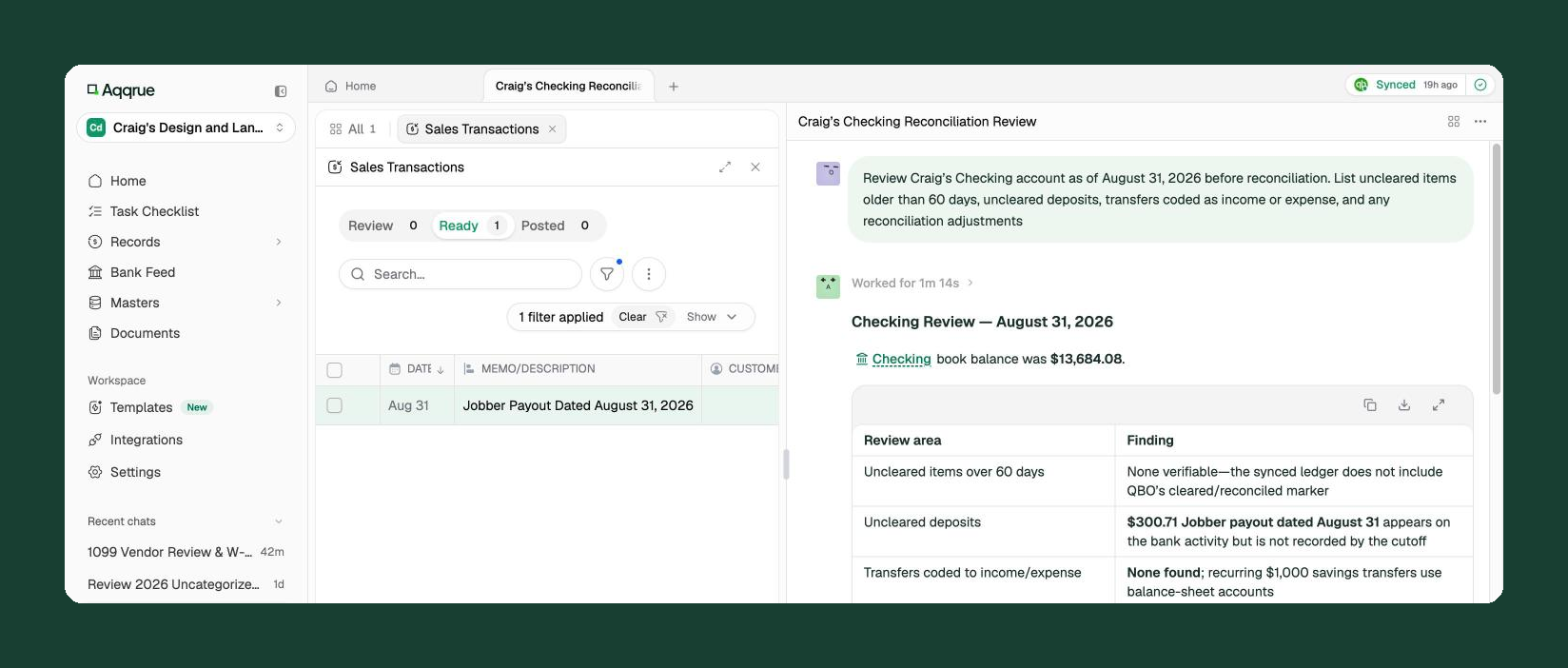
You ask Aqqrue to do a job, and it prepares the work across your client files. That includes bank and credit card reconciliations, journal entries, accruals, month-end closes, book reviews and cleanups. It can review a new client's past QuickBooks data before you take them on, and it can turn a sales report into double-entry journal entries.
Here's how it answers the seven questions above:
- Client data: Aqqrue does not use customer financial records, uploaded documents or prompts to train its models or third-party foundation models. Customer data is encrypted in transit and at rest. Read the Aqqrue security and data protection commitments for details.
- Security proof: Aqqrue holds a current SOC 2 Type II report and is GDPR and HIPAA compliant. Its security safeguards include encryption of customer data in transit and at rest, role-based access controls and SSO where supported. Security documentation is available through the Aqqrue trust center.
- Review first: Nothing posts to QuickBooks Online until an accountant reviews and approves it.
- Learning: Aqqrue learns from your firm's own past transactions for each client, so repeat work shrinks over time.
The judgment calls, the client conversations and the final sign-off all stay with you and your team. Aqqrue prepares accounting work across client files, helping your team spend less time on manual preparation and more time reviewing results, investigating exceptions and making accounting judgments.
If you'd like to see it on your own client files, you can request early access here.