
This post is for bookkeepers and staff accountants who keep the books for small business clients in QuickBooks Online. Accounts payable is a single line on the balance sheet, but errors in that balance can hide duplicate expenses, unpaid bills and vendor credits that were never applied. Usually they find out when a vendor calls about a "missed" payment, or when the tax preparer asks why an expense shows up twice. Below we cover what accounts payable is, how it moves through QBO, and six checks to run on each client file before the financials go out.
What is accounts payable?
Accounts payable is the total a business owes its vendors for things it has already received on credit. Assuming the purchase was made on credit and the bill was recorded, the $2,400 remains in AP until the payment is applied.
Here are the two entries (illustrative numbers):
| Event | Debit | Credit |
|---|---|---|
| Bill entered when the mulch arrives | Job materials $2,400 | Accounts payable $2,400 |
| Bill paid 30 days later | Accounts payable $2,400 | Checking $2,400 |
AP is the mirror image of accounts receivable. AP is money going out to vendors and is a liability, while AR is money coming in from customers and is an asset. Intuit notes that entering bills matters most for clients who report on an accrual basis, since that's where an unpaid bill already counts as an expense.
How accounts payable works in QuickBooks Online
QBO gives clients three ways to record a purchase, and only one of them creates a payable.
| Transaction | When to use it | Touches AP? |
|---|---|---|
| Bill | Goods or services received now, paid later | Yes, adds to AP |
| Bill payment (Pay bills) | Paying a bill already in QBO | Yes, clears AP |
| Check or Expense | Paid at the time of purchase | Typically no |
Intuit is direct about the mix-up we see most: "Do not use a Check or Expense to pay an existing bill." If a client does it anyway, the bill stays open on the reports and the vendor balance never comes down (Intuit: bills, checks and expenses).
Bills reach QBO in a few ways. Someone can create one from + New > Bill, upload it on the Bills page, or receive it through the QuickBooks Business Network. Uploaded and network bills wait in a For review tab until someone approves them (Intuit: enter bills).
Six AP checks to run on every client file
Run these as part of the month-end close, ideally after transaction coding and bank reconciliation are substantially complete. They slot into the wider month-end review checklist your team may already use.
| Check | Where to look in QBO | Usual fix |
|---|---|---|
| 1. AP aging ties to the balance sheet | Accounts payable aging summary and Balance Sheet (accrual), same date | Set aging to Report date; find entries that hit AP without a bill |
| 2. Bills paid with a check or expense | AP aging detail next to the vendor's transactions | Record the payment through Pay bills; remove the stray expense |
| 3. Duplicate bills | AP aging detail sorted by vendor and amount | Delete the copy; turn on the duplicate bill number warning |
| 4. Unapplied payments and credits | Negative lines in AP aging | Link the payment or credit to its bill |
| 5. Old bills | The 91-and-over column | Confirm each one with the client |
| 6. Missing bills | Regular vendors with no bill this month | Enter the bill or book an accrual |
- Tie AP aging to the balance sheet
Once the dates, accounting basis and aging method are aligned, investigate the remaining difference. Common causes include journal entries posted directly to AP, unapplied bill payments, vendor credits and transactions recorded with incorrect dates. Drill into the AP balance on the balance sheet to identify the transactions.
- Look for bills paid with a check or expense
If the vendor was actually paid, the expense may now be recorded twice: once through the original bill and again through the check or expense. Meanwhile, the original bill remains open in AP. Confirm that the payment relates to the bill before correcting the records. If it does, apply the payment through Pay bills and review the duplicate expense transaction.
- Catch duplicate bills
Duplicates creep in when a client uploads a bill someone already typed in, or a vendor emails the same invoice twice. Sort the AP aging detail by vendor and amount and the copies stand out. Then go to Account and settings > Advanced > Other preferences and turn on the duplicate bill number warning. It only fires for the same vendor and bill number, so a copy saved with no bill number will still slip through.
- Clear unapplied vendor payments and credits
A bill payment or vendor credit that isn't linked to a bill shows up as a negative line in the aging report. On cash-basis reports, QBO can also park these in an account called Unapplied Cash Bill Payment Expense. Open the payment or credit and link it to the bill it was meant for. Once the payment or credit is correctly applied, the open bill and unapplied balance should be updated accordingly. Re-run the aging report to confirm the vendor balance is correct.
- Ask about old bills
An old bill may still be owed, under dispute, or already paid outside QBO, such as with the owner's personal card. Confirm the status with the client and obtain supporting documentation. If it was paid, record the payment correctly and clear the bill. If it's disputed, determine whether the obligation remains outstanding before adjusting AP. Document the resolution so next month's review doesn't start from zero.
Taking on a new client with years of messy AP? Work through our bookkeeping checklist for new clients before the first close.
- Check for missing bills at month-end
Rent, utilities, software and subcontractors tend to bill on a schedule. If a regular vendor has no bill for the month, ask the client for it or book an accrual and reverse it next month. Our guide to journal entries in QuickBooks Online covers the accrual and the reversal. Getting subcontractor bills right now also saves time when you work through the 1099 checklist in January.
How Aqqrue reviews accounts payable
None of these six checks is hard on its own. Running them on 30 client files in the same week is where the time goes. Aqqrue runs the AP review across a client's QBO file and lines up open bills against payments, credits and vendor history. You start with a short list of items to look at, not a blank aging report.
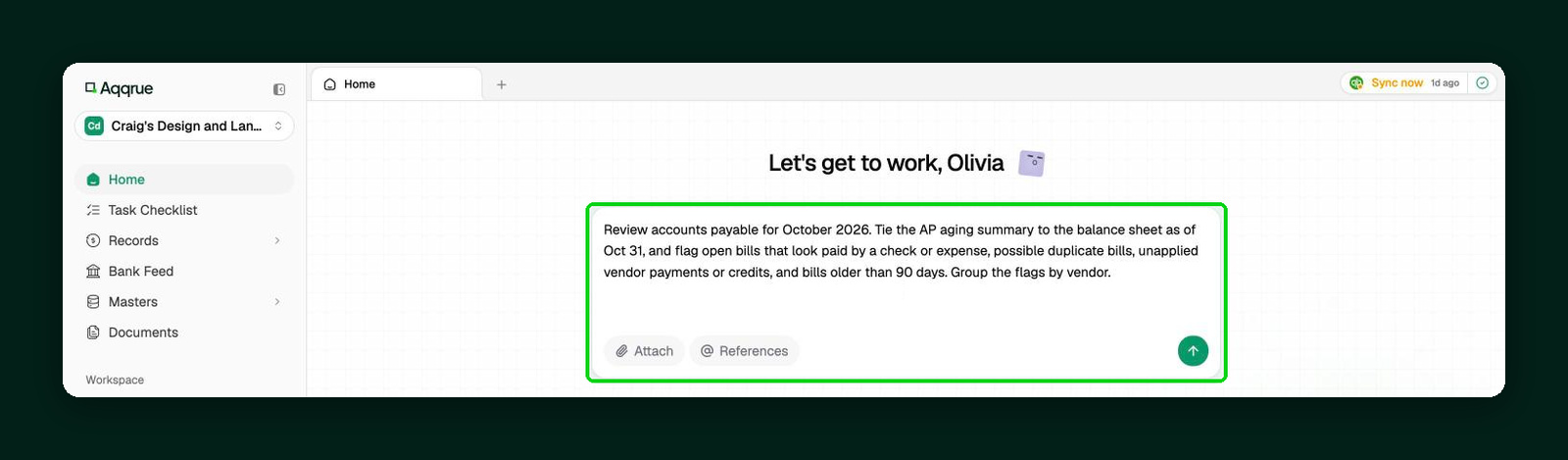
1. Run the review. Pick the client and the period, and Aqqrue compares AP against the balance sheet.
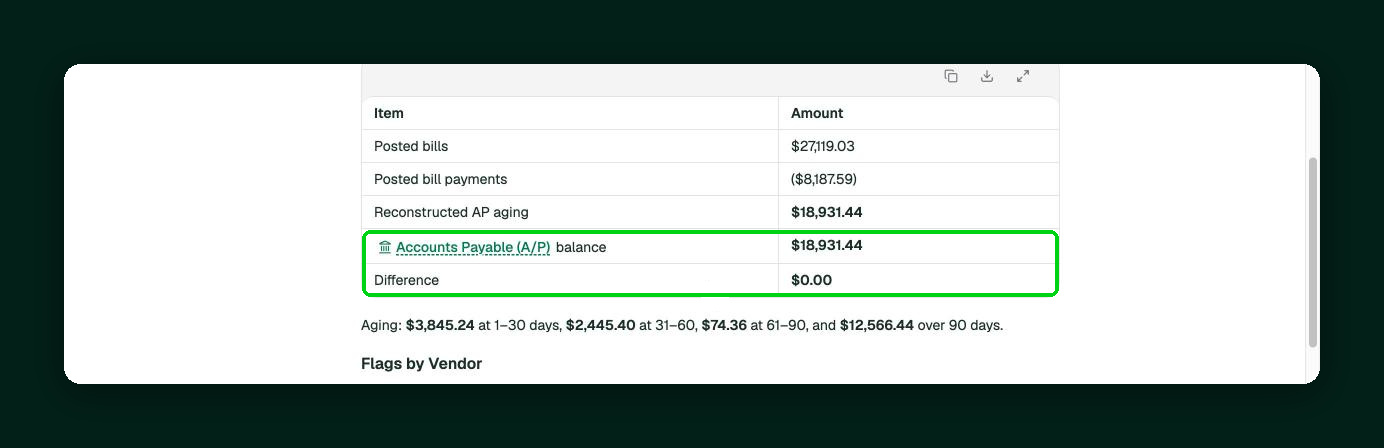
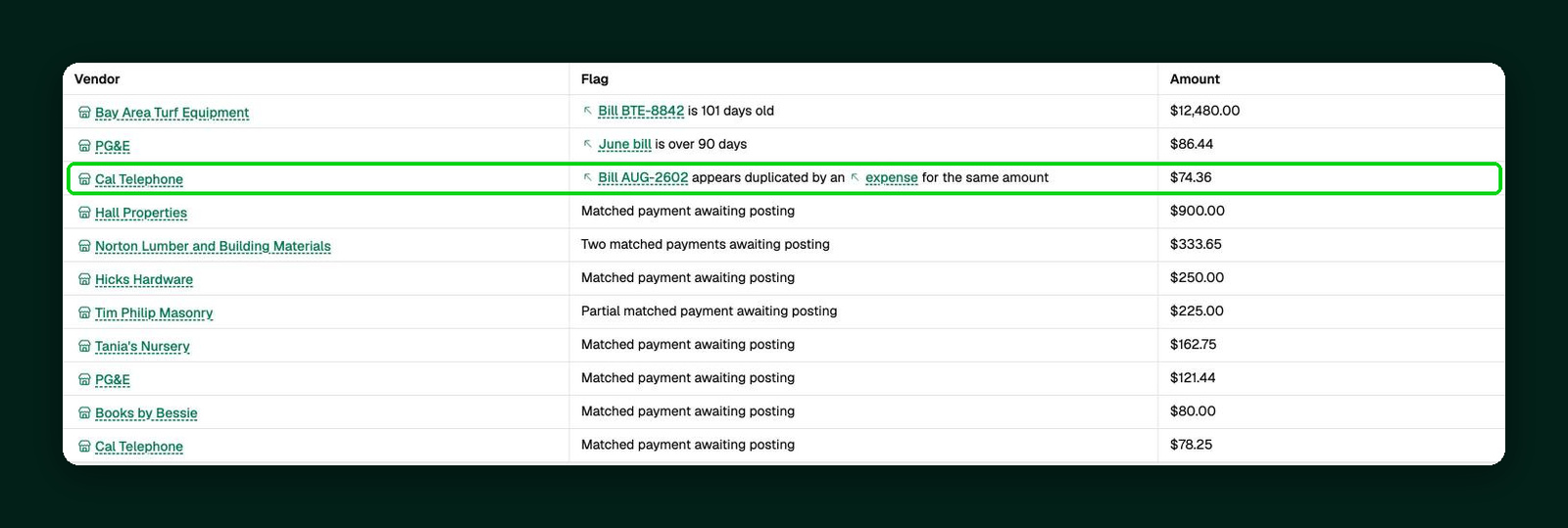
2. See the flags by vendor. Open bills with a matching check or expense, likely duplicates, unapplied payments and old bills each come with the transactions behind them.
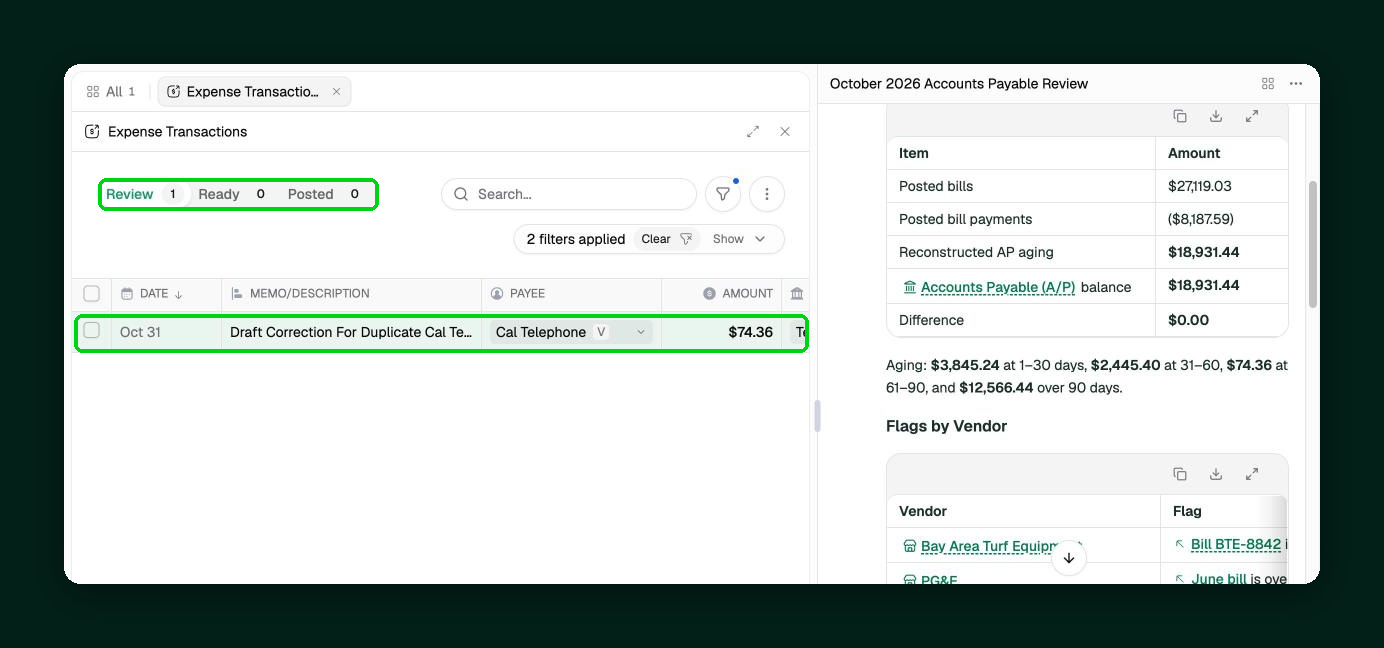
3. Approve the fixes. For the Cal Telephone bill that was also paid as an expense, Aqqrue drafts the correction and leaves it in Review for you to edit or approve.
Aqqrue finds the mismatches and drafts the fixes, but deciding what the client actually owes is your call, and nothing changes in QBO until you approve it. Aqqrue has completed an independent SOC 2 Type II examination and does not use client data to train its AI models.