
If you do the books for a few dozen small businesses, you write journal entries every month: accruals, prepaid insurance, a client's sales report, the odd correction. Each one takes a minute to enter. Checking all of them, across every client, can take most of a day.
This guide shows how to write one in QuickBooks Online, with three worked examples, a five-point review checklist, and how Aqqrue drafts the entries for your review.
What a journal entry is (and isn't)
A journal entry records a transaction as debits and credits to specific accounts. Every entry must balance: total debits equal total credits.
Intuit describes a QBO journal entry as a way to record a transaction without a standard form like an invoice or bill. Intuit also suggests creating them as a last resort or with an accountant's help. That's good advice. If a vendor bill belongs in A/P, enter it as a bill so it shows up in A/P aging and the vendor's history. A journal entry skips all of that.
So use a journal entry when the work is accounting, not data entry:
| Entry type | When you'd use it | Example |
|---|---|---|
| Accrual | Expense incurred, bill not received yet | October utilities billed in November |
| Prepaid amortization | Cash paid upfront, expense spread over months | Annual insurance policy |
| Depreciation | Spreading a fixed asset's cost over its life | Monthly depreciation on a work truck |
| Reclass | Amount sits in the wrong account | Owner's personal charge coded to Supplies |
| Summary entry | A report summarizes many transactions | Weekly POS or payout report |
| Correction | Correcting a posting error after reviewing the original transaction | Correcting an amount or account posted incorrectly when editing the original transaction isn't the appropriate solution |
Accrual-basis books commonly require entries for accrued expenses, prepaid expenses, and depreciation. Cash-basis engagements often involve fewer period-end accruals, but reclasses, corrections, sales summaries, and other adjustments may still be necessary depending on the client's reporting requirements and the purpose of the financial statements.
Journal entry or standard QBO form? Decide this first
Standard forms do more than post debits and credits. They also update the lists and reports that you and your client rely on. A journal entry posts the amounts and skips the rest.
| What happened | Use this QBO form | What a journal entry would miss |
|---|---|---|
| Client billed a customer for work | Invoice | A/R aging, the customer's balance and statements |
| Customer paid an open invoice | Receive payment | Closing out the invoice, so it stops showing as unpaid |
| Customer paid at the time of sale | Sales receipt | Customer and product or service sales history |
| Vendor bill to pay later | Bill | A/P aging, due dates and the vendor's history |
| Client paid a vendor | Bill payment, check or expense | Clearing the open bill and the vendor's payment history |
If a row fits, use the form. A journal entry posted in its place can get the account balance right and still leave open invoices, open bills and aging reports wrong. Fixing that later means finding the entry, reversing it and re-entering the transaction on the right form.
When no form fits, the work is accounting rather than data entry. That's when a journal entry is the right tool:
| Entry type | When you'd use it | Example |
|---|---|---|
| Accrual | Expense incurred, bill not received yet | October utilities billed in November |
| Prepaid amortization | Cash paid upfront, expense spread over months | Annual insurance policy |
| Depreciation | Spreading a fixed asset's cost over its life | Monthly depreciation on a work truck |
| Reclass | Amount sits in the wrong account | Owner's personal charge coded to Supplies |
| Summary entry | A report summarizes many transactions | Weekly POS or payout report |
| Correction | Correcting a posting error after reviewing the original transaction | Correcting an amount or account posted incorrectly when editing the original transaction isn't the appropriate solution |
Accrual-basis books commonly require entries for accrued expenses, prepaid expenses, and depreciation. Cash-basis engagements often involve fewer period-end accruals, but reclasses, corrections, sales summaries, and other adjustments may still be necessary depending on the client's reporting requirements and the purpose of the financial statements.
How to make a journal entry in QuickBooks Online
The mechanics take a minute. Per Intuit's help article:
- Select + Create, then Journal entry.
- On the first line, pick an account and enter the amount as a debit or credit.
- On the next line, pick the other account and enter the same amount in the opposite column.
- Add more lines if needed, keeping debits and credits equal.
- Write a memo explaining the reason.
- Select Save and close.
To see every entry posted, run the Journal report. If an entry needs undoing, QBO's Reverse option creates a new entry that swaps the debits and credits. For an accrual that will be replaced by a bill in the following period, you can schedule a reversing entry for the first day of the next month. When the bill arrives, enter it through the normal bill workflow and verify that the reversal and bill leave the correct expense and liability balances. Not every adjusting entry should automatically reverse.
Also watch: How to create a complex payroll journal entry in Aqqrue
A reversing entry creates a separate transaction; it does not delete the original journal entry. Confirm the reversal date and resulting balances before closing the next period.
A worked example: three entries for one client
Here's a month-end on QBO's sample company, Craig's Design and Landscaping Services. The numbers are illustrative.
1. Accrue October utilities
The October bill arrives November 12, estimated at $420.
| Account | Debit | Credit |
|---|---|---|
| Utilities | $420.00 | |
| Accrued Liabilities | $420.00 |
If the client's chart of accounts doesn't already have an appropriate accrued expense or other current liability account, create one using the correct account type. Reverse the accrual in November if that is the firm's chosen process for handling the expected bill. When the bill arrives, enter it through Accounts Payable as usual and verify that the reversal and bill don't duplicate or misstate the November expense or liability.
2. Amortize prepaid insurance
Craig paid $2,400 in January for a 12-month policy, so $200 moves to expense each month.
| Account | Debit | Credit |
|---|---|---|
| Insurance Expense | $200.00 | |
| Prepaid Insurance | $200.00 |
3. Book a weekly sales report
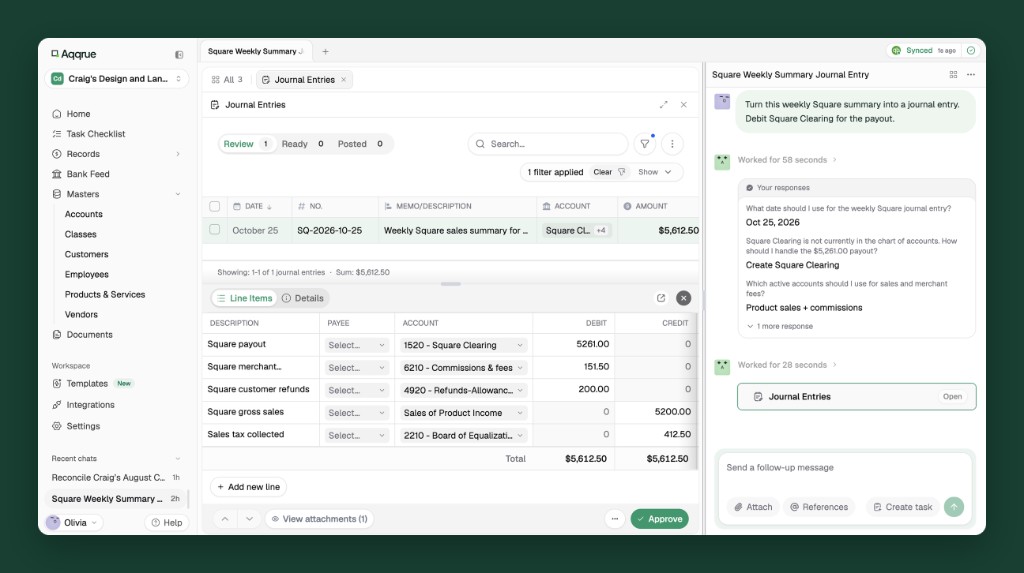
This example is for a client whose Square activity reaches you as a report that you book by hand. Assume the weekly report shows four things: $5,200 in gross sales (excluding sales tax), $412.50 in sales tax collected, $200 in refunds, and $151.50 in processing fees. Square paid out the rest, $5,261, to the client's bank. For simplicity, all figures fall in one settlement period with no other adjustments.
Start by checking that the report ties out. Sales and tax coming in, minus refunds and fees going out, should equal the payout:
| Report line | Amount | Where it goes in the entry |
|---|---|---|
| Gross sales | $5,200.00 | Credit Sales |
| Sales tax collected | + $412.50 | Credit Sales Tax Payable (owed to the state, not income) |
| Refunds | − $200.00 | Debit Refunds, a contra-income account that reduces sales |
| Processing fees | − $151.50 | Debit Merchant Fees, an expense |
| Net payout | $5,261.00 | Debit Square Clearing until the deposit lands |
Then book the summary entry:
| Account | Debit | Credit |
|---|---|---|
| Square Clearing | $5,261.00 | |
| Merchant Fees | $151.50 | |
| Refunds | $200.00 | |
| Sales | $5,200.00 | |
| Sales Tax Payable | $412.50 | |
| Total | $5,612.50 | $5,612.50 |
The entry balances at $5,612.50 on each side, and Square Clearing now holds the $5,261 payout on its way to the bank.
When the payout reaches the bank, record a transfer from Square Clearing to Checking and match it to the deposit in the bank feed:
| Account | Debit | Credit |
|---|---|---|
| Checking | $5,261.00 | |
| Square Clearing | $5,261.00 |
After the transfer, Square Clearing should be back to $0. A balance left in clearing means a payout, refund or fee hasn't been matched yet. Real settlements often span dates, and a refund can come out of a later payout, so reconcile the clearing account to Square's payout reports each month.
Check the client's Square setup first. This summary entry fits a client whose Square sales you book from reports. Many clients connect Square to QBO through an app instead, and those connections differ. Depending on the app and its settings, it may already post sales, refunds, fees or deposits, one by one or as daily summaries. Look at what the connection already records before you add anything. A summary entry on top of synced sales counts the revenue twice.
How to review a journal entry before it posts
Writing the entry is the easy part. Reviewing them across every client is where the hours go. Run these checks on each manual entry:
- Form or journal entry: Should this have been an invoice, bill, payment or expense instead? If a form fits, reverse or delete the entry and record the transaction on that form.
- Period and cutoff: Is the entry dated in the correct accounting period? Has the period already been closed? If the closing date needs to be changed, confirm that an authorized user can make the change.
- Balance and account mapping: Do total debits equal total credits? Are the accounts and account types appropriate? Investigate unexpected postings to holding accounts.
- Memo and supporting evidence: Does the memo explain the purpose of the entry? Is the supporting bill, schedule, calculation, or report attached or otherwise retained?
- Reversal and recurrence: If the entry should reverse, is the reversal date and process documented? For recurring entries, confirm that the amount, frequency, accounts, and underlying assumptions are still correct.
- Financial statement impact and completeness: Does the entry produce the intended result on the balance sheet and profit and loss statement? Run the Journal report for the period and investigate entries you didn't prepare or approve, including entries posted by clients or other users.
A journal entry can balance perfectly and still be wrong. Review the supporting evidence, account mapping, accounting period, and effect on the financial statements before approving it.
For a full month-end routine, pair this with our month-end review checklist. If the Journal report turns up years of unexplained entries, that's a cleanup, and our bookkeeping cleanup guide covers how to scope one.
How journal entries work in Aqqrue
Well, five checks per entry is fine for one client. Across 30 clients, those reviews can consume an entire afternoon. Luckily, this is the kind of repeat work Aqqrue is built for.
Aqqrue connects to each client's QBO file and imports their history, so it can see how that client has booked similar items before. Here's what the same three entries look like there.
Sales reports become entries
Drop in any sales or payout report, like a Square summary or a client's spreadsheet. Aqqrue drafts the double-entry journal entry, mapped to that client's accounts. It also connects directly to apps like Square and Stripe, so you don't always need the export.
I paste the report in, and Aqqrue creates the journal entries for me. Then I click through each row, check that everything looks good, and post it. It's super quick.
Joseph C.solo bookkeeper with about a dozen QBO clients
Recurring entries follow the client's own pattern
Aqqrue learns from your firm's past transactions for each client. Tell it once that Craig's insurance amortizes at $200 a month, and it drafts that entry every month.
Accruals sit on your month-end checklist
Import the month-end checklist you already use, and Aqqrue prepares the accruals and reversals as part of each month-end.
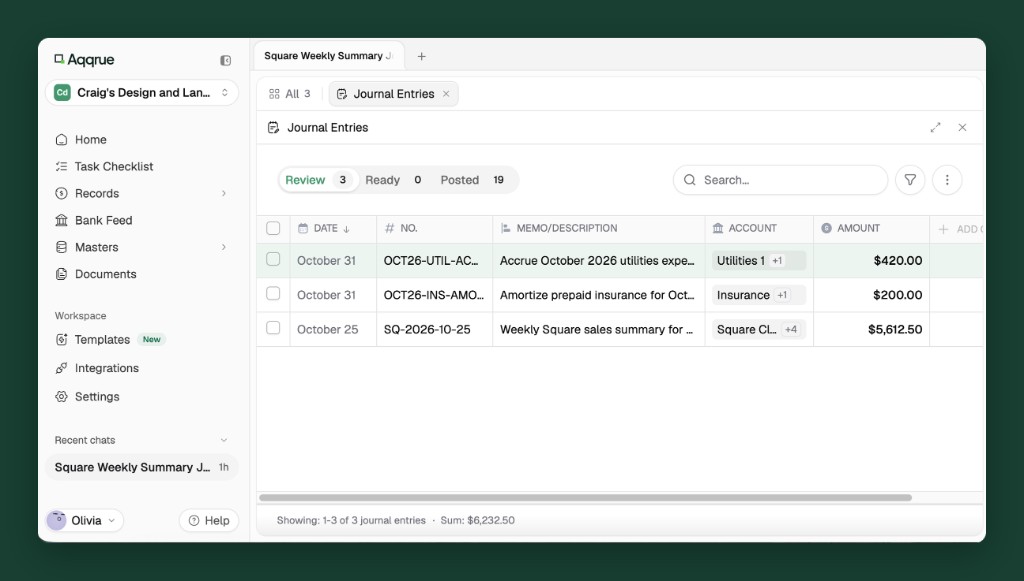
Every draft shows its lines, memo and source, so the review checks above take seconds instead of a scroll through registers. Nothing posts to QBO until you approve it. The judgment, and the sign-off, stay with you.
If month-end means preparing and reviewing entries in 20 or 30 client files, see how Aqqrue drafts them across every client and lines them up for your sign-off.